
While no one can completely prevent a cyber security attack, there are steps that businesses can take to reduce the chances of an attack. In this article, we will discuss some essential cyber security attack prevention measures that businesses should take in order to stay safe.
Use Strong Passwords
A strong password can prevent unauthorised access to devices and networks.
Having different passwords set up for every application you use is a real benefit to your security, and changing them often will maintain a high level of protection against external and internal threats.
Ensure you use special characters, letters, and numbers in your passwords, as well as combine upper and lower case letters. If you find it difficult to remember multiple passwords, you can use a reputable password manager to store them. This will ensure that you are always able to access your accounts, but also provide additional security for your business.
Keep Your Software Up to Date
When it comes to cybersecurity, one of the simplest yet most effective measures you can take is to keep all your software up to date. It is important to have the latest updates and patches installed, as they often contain security fixes and other improvements that are designed to protect your system from potential threats.
Keeping your software up to date means more than just updating your operating system; it also includes updating all the applications and programs you use on a regular basis. Applications like web browsers, email programs, and third-party plugins are all prone to security vulnerabilities and need to be updated regularly. Make sure to check for updates regularly, or you can set up automatic updates so your system is always up to date.
You should also consider running anti-virus scans on a regular basis. Anti-virus software will scan for any malicious code or viruses on your system and help protect against future attacks.
By staying on top of software updates and running anti-virus scans regularly, you can help prevent cyber security attacks from happening in the first place. Doing so is one of the best ways to protect your business from a potentially devastating attack.
Educate Your Employees
Employee education is an important step towards preventing cyber security attacks. Train your employees on the basics of cyber security, like recognising suspicious emails and links, not downloading files from untrusted sources, and using strong passwords. Make sure everyone understands their role in the company’s cyber security plan and what is expected of them.
Make sure to regularly update your employees on any new or changes to the company’s security protocols.
It is also important to ensure that all employees are aware of the latest risks and how they can be mitigated. Regularly provide security-related updates and encourage employees to attend cybersecurity courses/webinars.
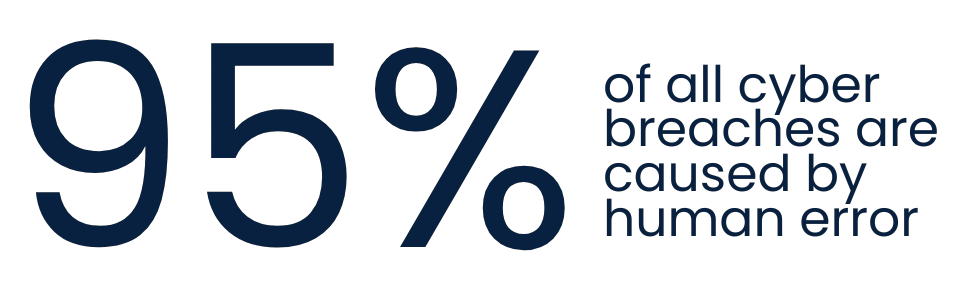
Ultimately, the goal is to make sure that everyone in the company is aware of the importance of cyber security and how it relates to their everyday job duties. By taking the time to educate your employees on the dangers of cyber security threats and providing them with the necessary resources, you will create a stronger defence against potential attacks.
Use Two-factor Authentication
Two-factor authentication (2FA) is a type of Multi-factor Authentication that requires two separate steps to verify user identity. These steps could include a combination of something the user knows, such as a password; something they have, such as a one-time security code sent to their phone; and something they are, such as biometric information. By requiring a second step in the authentication process, it makes it much harder for cybercriminals to gain access to your systems and data.
When implementing 2FA, it’s important to choose a solution that meets your security needs. Common solutions include SMS-based authentication, authentication apps, hardware tokens, and biometric authentication. The key is to select an option that meets the security needs of your business while also being convenient for users.
In addition to protecting user accounts, 2FA can be used to protect physical access points and other systems within your organisation. For instance, you may use 2FA to secure entry into an office building or to authenticate transactions on your financial systems.
Overall, 2FA is an essential component of any comprehensive cyber security strategy. It is simple to implement, highly effective in preventing unauthorised access, and provides extra peace of mind to both organisations and their customers.
Backup Your Data
Take regular backups of important data: Your backups should be scheduled at least daily, but if the rate of change of the data is high, then more frequent backups may be needed.
Ensure your backups are secure: If your backups are not encrypted, they can easily be stolen or corrupted. Make sure you use a secure encryption method to protect your data.
Store your backups in a secure offsite location: Storing your backups offsite ensures that your data is not vulnerable to on-site incidents such as fires, floods or other disasters.
Test and verify the integrity of your backups: Regularly check to make sure your backups have been taken correctly and that the data is recoverable.
Consider using a cloud-based backup solution: Cloud-based backup solutions offer added convenience and an extra layer of security as they keep your data encrypted while in transit and at rest.
Access Management
Access management is a powerful tool that helps protect your business from cyber security attacks. By setting policies and procedures to monitor user access permissions, you can ensure that only authorised individuals are granted access to sensitive information and resources. Additionally, you can use step-up authentication to verify the user’s identity whenever the risk level changes.
Another way to protect your business is by limiting administrative rights. Blocking your staff from installing software or accessing certain data on your network can prevent malicious software from infecting your systems.
When it comes to protecting your business from cybersecurity threats, access management is an essential tool. Limiting admin rights can help prevent malicious software from infiltrating your systems. Implementing these measures will help protect your business from cyber security attacks.
Secure Your Wireless Networks
When setting up your wireless network, it is important to ensure that the network is secure. To do this, it is essential to take a few simple steps:
Change all default passwords – Changing the default password on any device connected to the network is an important step. It will help protect against anyone trying to access the device using a pre-determined password.
Restrict access – Only allow authorised users to access your network. This will help prevent any unauthorised access.
Use encryption – Encryption prevents anyone who might be able to access your network from viewing its contents. It is important to use the appropriate encryption protocol for your network to provide the necessary protection.
Monitor regularly – Regularly monitoring your network for suspicious activity will help identify any potential threats and allow you to address them quickly.
By following these steps, you can help ensure that your wireless network remains secure and that any potential cyber security threats are minimised.
Dispose of Data Properly
Data destruction is a critical part of data security and organisations should take it seriously and need to be careful about how the disposal of data is carried out. Failure to stick to proper data destruction policies or methods may open the floodgates of data insecurities leading to cyberattacks and business losses.
To securely dispose of data, it’s important to have a data destruction policy in place and methods for your organisation. Consider educating your team to understand the importance of securely destroying data.
Knowing how to safeguard your business from cybercrime and malicious cyber activity can be daunting. With a surplus of resources and a mixture of varying opinions, it can be hard to determine what is the right solution for your business and your employees.
Get in touch with us today for a no-obligation cyber security assessment. We can help kickstart your journey to becoming secure.
